Flexbox / Flexbox Group
Layouting of 2D Video and Flexbox Group entities in screen-space coordinates using the CSS Flexible Box Module.
Please see https://developer.mozilla.org/en-US/docs/Web/CSS/CSS_Flexible_Box_Layout/Basic_Concepts_of_Flexbox for more information.
| There is only allowed to be one Flexbox in each scene, but there could be multiple Flexbox Groups. |
Use Case
When displaying videos in a flat context it can be a pain to layout the different cameras in a nice and easily configurable way.
Flexbox entity is used as root layouting node and subsequent children are Flexbox Group entities and 2D Video entities which can be laid out in the desired way using the settings below. If you are familiar with web development you can think of the flexbox child entities as div elements in HTML, where the flexbox settings are the CSS styling applied to them.
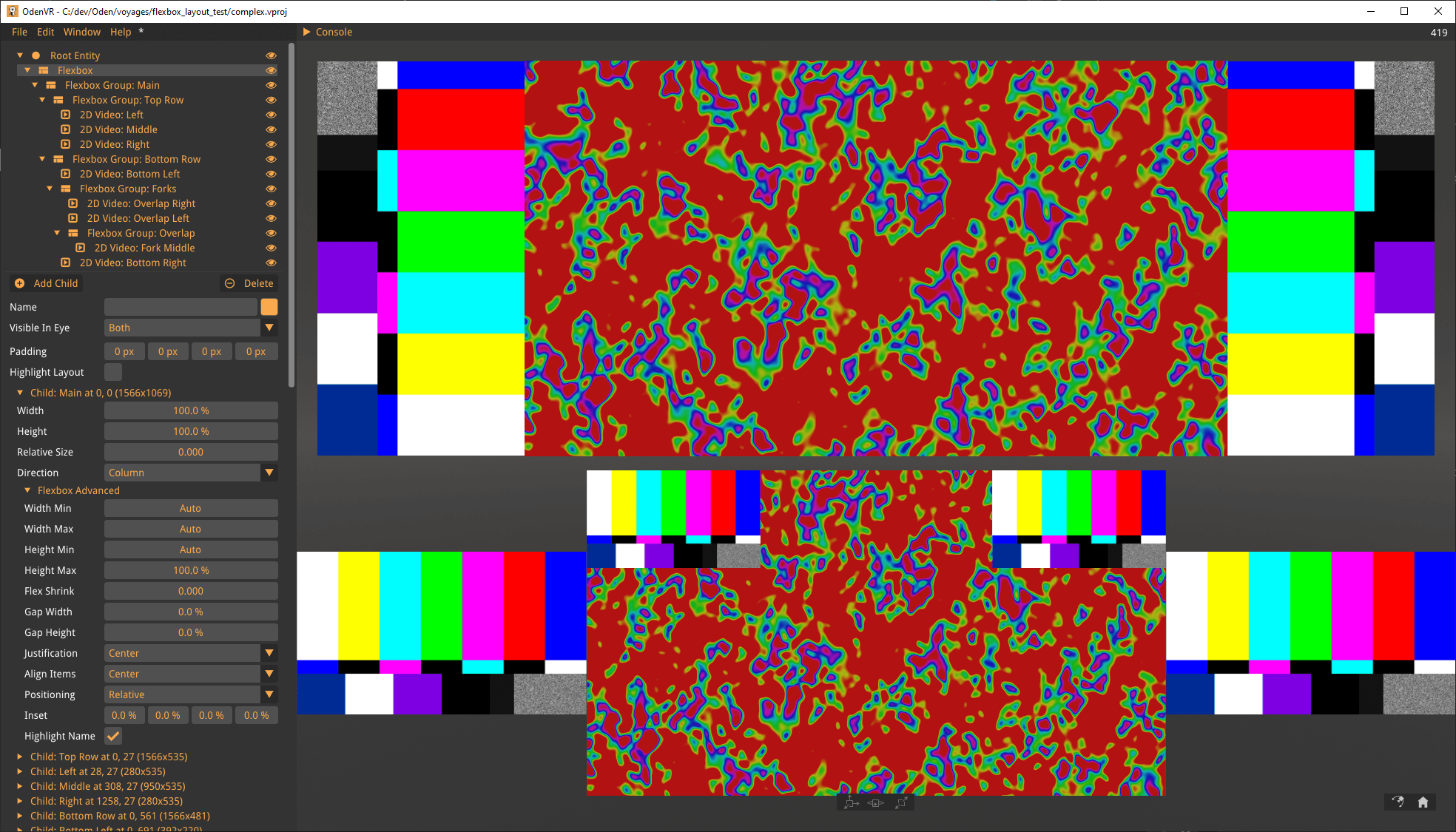
Flexbox
Usage
Flexbox entity is used as root layouting node where some highlighting settings are available for easier development of the flexbox layout.
The padding for the viewport can be configured to limit the area where the layout should be constrained to.
All flexbox children are shown as tree-nodes and can be configured directly or by clicking into an Flexbox Group.
Settings
- Padding
-
Viewport padding top, right, bottom, and left.
- Highlight Layout
-
Highlights the flexbox child boundaries when hovered over in the viewport.
- Highlight Bounds
-
Turns the highlighting of the layout to be always on.
- Highlight Color
-
Set the color of the highlight box.
- Text Color
-
Set the color of the text overlay.
- Border Color
-
Set the color of the highlight border.
- Border Thickness
-
Set the thickness of the highlight border.
Flexbox Group
Usage
Use the Flexbox Group entity to group two or more cameras or Flexbox Groups which should be laid out in relation to one another. No need to use a Flexbox Group entity above a single 2D Video.
Flexbox Groups are laid out in relation to one another with bounds which can be highlighted by the Highlight Layout Setting.
Within the Flexbox Group the 2D Videos are laid out with the boundary as the constraint.
Settings
- Width
-
Set the width of the flexbox child.
- Height
-
Set the height of the flexbox child.
- Min Width
-
Set the minimum width of the flexbox child.
- Min Height
-
Set the minimum height of the flexbox child.
- Max Width
-
Set the maximum width of the flexbox child.
- Max Height
-
Set the maximum height of the flexbox child.
- Gap Width
-
Set the gap between flexbox children within a flexbox group width wise.
- Gap Height
-
Set the gap between flexbox children within a flexbox group height wise.
- Relative Size
-
Set the proportion the flexbox child should take within the flexbox container (the underlying CSS property is
flex-grow). - Flex Shrink
-
Set the proportion the flexbox child should shrink relative to the other flexbox children within the flexbox container.
- Inset
-
Control the top, right, bottom, and left margins
- Justification
-
Defines how flexbox children are distributed using space between and around the flexbox children along the main-axis of a flexbox group.
- Align Items
-
Align a flexbox child to the Left, Right or Center.
- Direction
-
Control if the flexbox children should be laid out in column or row within a group.
- Positioning
-
Control if positioning should be done relative to the flexbox group or absolute in relation to the viewport.
- Highlight Name
-
Set if the entity name should be drawn over the highlight box.