Audio Streaming
The system has built-in one- and two-way audio streaming support available in the Streamer Output and in the Remote Streamer entity.
-
In Streamer it is accessible under
-
In Remote Streamer it is accessible under
|
Linux specifics
See Linux audio setup for instructions. |
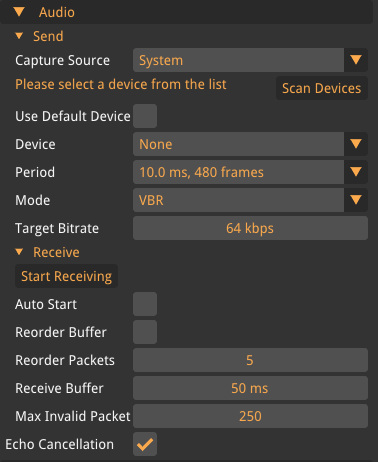
- Audio Processing
-
- Enable
-
Enables the audio processing module.
- Echo Cancellation
-
Sets the echo cancellation level: None, Low, Moderate (default), or High.
- Noise Suppression
-
Sets the noise suppression level: None, Low (default), Moderate, High, or Very High.
- Compression Gain
-
Sets the compression gain in decibels, range 0–90 dB.
The audio processing module requires the Send Periodto be 480 frames.
- Send
-
- Use Default
-
Use the default audio recording device.
- Device
-
The device to use for streaming audio.
- Period
-
The number of audio samples to capture before sending. Valid values are 120, 240, 256, 480 (default), 512, 960, and 1024.
- Mode
-
VBR (variable bitrate) or CBR (constant bitrate).
- Target Bitrate
-
The desired bitrate in kbps, range 6–510 kbps, default 64 kbps.
- Receive
-
The receiver always uses the default audio playback device.
- Auto Start
-
Enable to automatically receive audio on project startup.
- Reorder Buffer
-
Enable to use a buffer for incoming packets. Useful in situations where the network has packet reordering.
- Reorder Packets
-
The maximum number of packets to keep in the reorder buffer. Default 5, range 0–4096.
- Receive Buffer
-
The amount of time that the audio playback system is allowed to buffer, in milliseconds. Default 90 ms, range 5–2000 ms.
- Max Invalid Packets In A Row
-
The number of invalid packets to receive before accepting them as valid. Default 200. Internally, a packet is invalid if it has an older timestamp than the previous packet. That can happen if the network has a lot of packet reordering, reorder buffer can help to mitigate this. It can also happen if the Streamer restarts, in that case, this setting determines how quickly new audio packets are accepted as valid.
If you experience choppy playback due to a jittery network, please try to first increase the receive buffer. Around 80 ms usually works fine on 4G networks. If that does not help, try activating the reorder buffer and experiment with the amount of reorder packets.